 KoEnJa한영일 · 韓英日 · KoEnJa
Korean, English, Japanese.
Just type. No switching.
KoEnJa is a keyboard for people who write Korean, English and Japanese every day. Type everything on the QWERTY layout you already use, Japanese in romaji, and each word comes out in the right language. Japanese turns into kanji as you type. There is no language switch key to press.
Windows 10 / 11 (x64) · Free · Open source (MIT) · Version 0.2.0
Android: APK available now (Android 8.0+) · iPhone: in App Store review
Just type. The language follows.
KoEnJa reads the keys you type and picks Korean, English or Japanese for each word.
Korean on the standard 2-set (두벌식) keys, Japanese in romaji, English as is — all on the same keyboard.
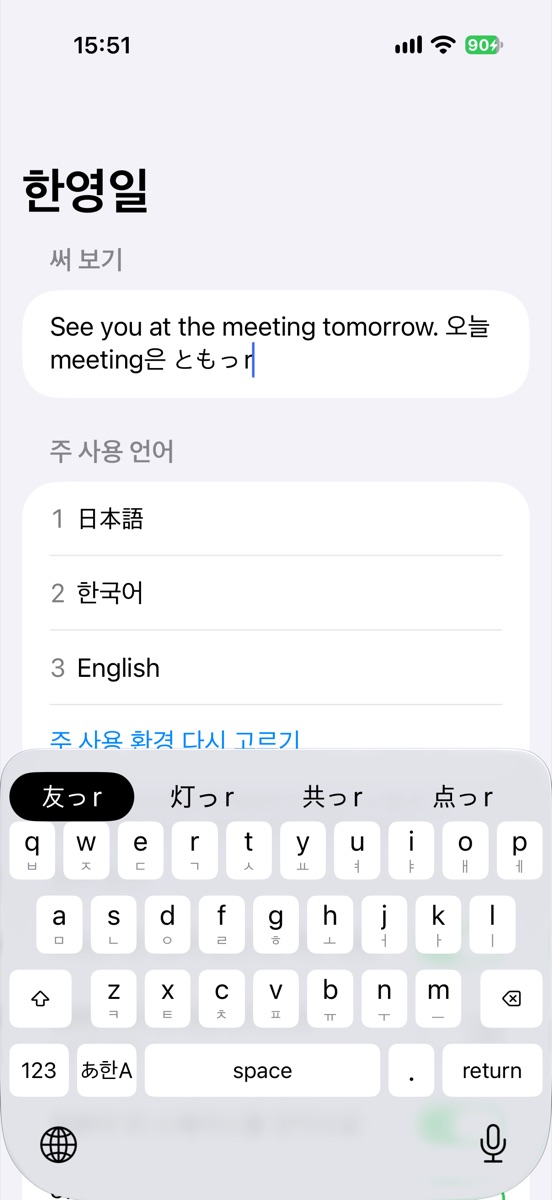
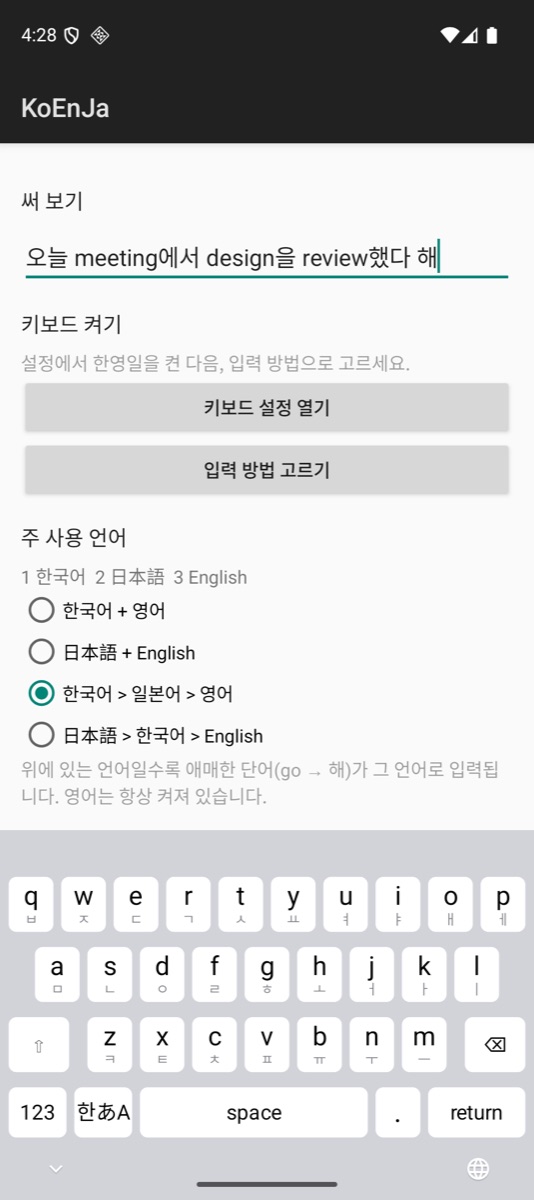
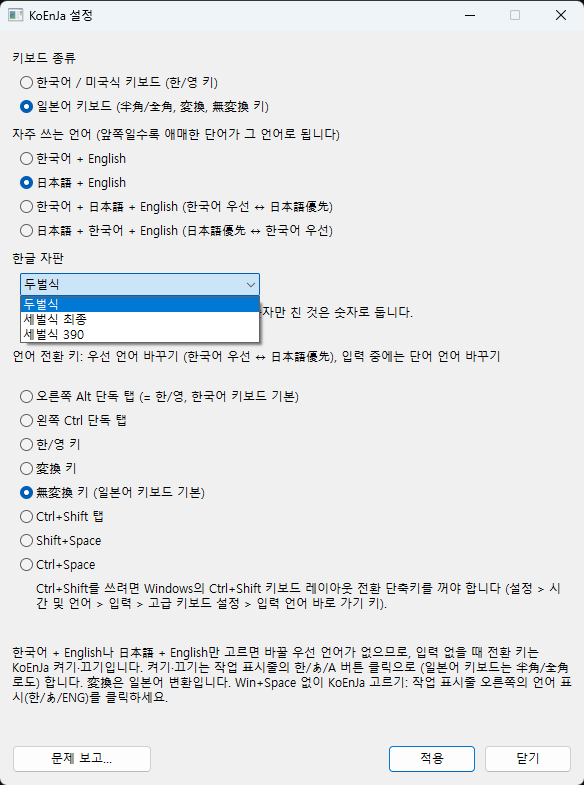
Screenshots
The iPhone and Android apps, and the Windows settings.
What it does
No switch key
KoEnJa looks at the keys you type and enters each word in Korean, English or Japanese.
Kanji as you type
Japanese typed in romaji is converted from kana to kanji as you go.
One key when it guesses wrong
If a word comes out in the wrong language, press the switch key once to change it.
Choose which language comes first
For words that could be either, KoEnJa follows the order you choose: Korean first (한국어 우선) or Japanese first (日本語優先).
Windows
Version 0.2.0 · Free. For Windows 10 / 11 (x64).
Works like Microsoft IME
Space to convert, F6–F10 for hiragana, katakana and alphanumeric, the Muhenkan (無変換) key, and Shift+←/→ to change segments. The keys you already know.
Korean and Japanese keyboards
Supports Korean (US layout) and Japanese (JIS) keyboards. Pick the Hangul layout in settings: 2-set (Dubeolsik), 3-set Final or 3-set 390 (Sebeolsik).
Pick your switch key
By default it is right Alt on Korean keyboards and Muhenkan (無変換) on JIS keyboards. You can change it in settings.
32-bit apps too
Built for 64-bit Windows, and works in 32-bit apps as well.
How to install
- Download the installer from the GitHub releases page.
- Run the installer. If SmartScreen shows a warning, click “More info”, then “Run anyway” (see below).
- When it is done, choose KoEnJa with Win+Space or from the language indicator on the taskbar.
If you see “Windows protected your PC”
Version 0.2.0 is not code-signed yet, so Windows SmartScreen shows a warning. Click “More info”, then “Run anyway” to install. See the Code signing policy below for how signing will work.
Platforms
WindowsAvailable · Free
Version 0.2.0. Windows 10 / 11 (x64).
iPhoneIn review
Waiting for App Store review.
AndroidAPK available
Version 0.2.1. Android 8.0+. Get the APK from the GitHub release. Google Play is coming (uninstall the APK before switching).
What you type goes nowhere.
On your device only
Language detection and kanji conversion all happen on your device.
No networking
The keyboard has no networking at all. No account, no ads, no analytics.
Open source
The source code is on GitHub, so anyone can check what it does.
See the Privacy Policy for details.
Open source
KoEnJa is open-source software, published on GitHub under the MIT License. Its language engine builds on Araso, also MIT-licensed.
Code signing policy
Free code signing provided by SignPath.io, certificate by SignPath Foundation
- Version 0.2.0 is not signed. Signing starts with the first release after SignPath Foundation accepts the project.
- Committers and reviewers: studioCIZMO
- Approvers: studioCIZMO
- Only the Windows installer and the files it installs are signed. Each is built by GitHub Actions from the public source, and every release is approved by hand before it is signed.
Privacy
This program will not transfer any information to other networked systems unless specifically requested by the user or the person installing or operating it.
FAQ
Is it free?
Yes. The Windows version is free. It is open source under the MIT License, with no ads.
Do I really never press a switch key?
Right. KoEnJa reads the keys you type and picks Korean, English or Japanese for each word. If a word comes out in the wrong language, press the switch key once to change it.
Windows says “Windows protected your PC” when I install.
That is because version 0.2.0 is not code-signed yet. Click “More info”, then “Run anyway” to install. Signing starts with the first release after SignPath Foundation accepts the project.
Is anything I type sent anywhere?
No. Everything is processed on your device, and the keyboard has no networking.
Can I use it on iPhone or Android?
The iPhone version is in App Store review. For Android, you can get the APK (KoEnJa-Android-0.2.1.apk, Android 8.0+) from the GitHub release page now, ahead of Google Play. A Google Play version is coming; to move to it later, uninstall the APK version first.
I found a problem. What should I do?
Please tell us through the problem report form on GitHub, or by email at cizmo@cizmo.net.
Try typing without switching — start on Windows.